Scheduled data syncs basic mechanism:
● A full data sync for each store runs daily at 6am AEST (19:00 UTC)
● A delta data sync runs every 30 minutes.
See Attachments for further information.
| Loyalty Pricing and Member Promo Price In the example screen shot, the Members Loyalty Price is coming through the Promo Price Field and then the integration is replacing the std "Price" field with the special price for non members. This logic doesn't currently apply to Multi price, where an item has a multi Promo Price and a Multi Members Loyalty Price. | 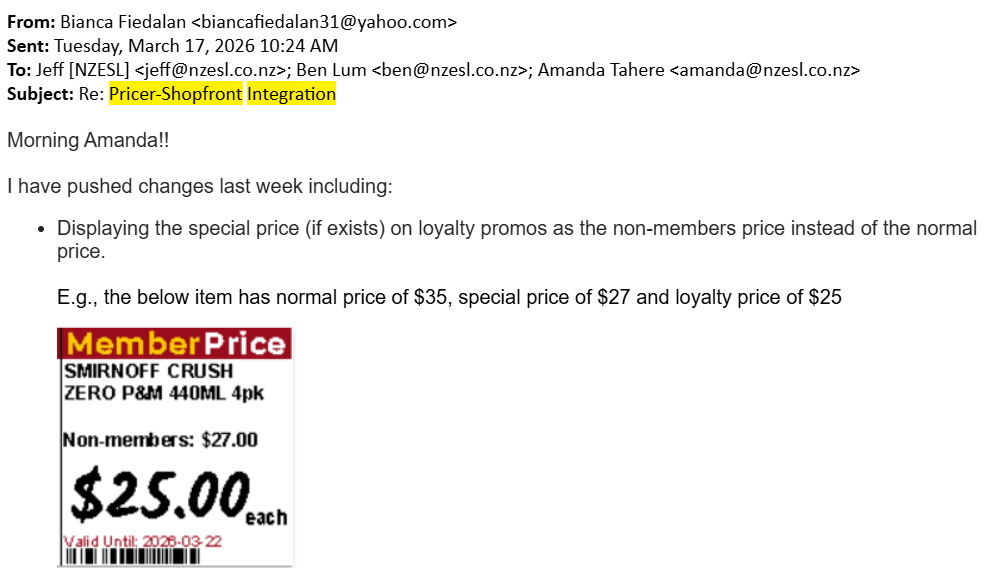 |
Promos must . . .
A promo will send within 30 mins if the above conditions have been met. When a promo is deactivated/deleted in POS, this information will send to Pricer, and promo removed, in the daily feed the following morning (Approx. 8:06AM). We are currently looking at more frequent full data updates and will advise if there are any changes to this. | |
Instore Promos must . . .
|
Was this article helpful?
That’s Great!
Thank you for your feedback
Sorry! We couldn't be helpful
Thank you for your feedback
Feedback sent
We appreciate your effort and will try to fix the article